NSS Automations, by Epiphani Studios

What you say is what you get.

Say what should happen, in one sentence, and save the agent it draws. From then on it watches for its moment, does the job, and writes down what it did, in words you can read.

Reflex agents route texts and email the minute they arrive. Reasoning agents read, decide, and draft for your approval. One console shows your whole staff.

Type the sentence. Read the agent.Watch a sentence become an agent
60 sbetween check-ins: every reflex agent is tried on each Mac every minute
2tiers of agent: reflex for the instant route, reasoning for the judgment call
8panes on every agent's page, from status and history through setup and adjustments
$0per run, on every plan. Designs are counted monthly; runs are never counted

The problem

You do not want automations. You want staff.

"When the bank texts me a code, put it in the team Slack." That sentence is the whole job. Yet the tools hand you a canvas of nodes, a card composer with a filter language, or a phone automation that quietly stops working the day an app comes off the phone. You end up learning the tool instead of getting the thing.

We audited our own decade of rented automations before building this. The most sophisticated one was a ten-step draft, filters and branches trying to fake judgment, that never ran once. The busiest one had sent the same notification 46 times: 14 blank lines and a link to the tool's own editor instead of the thing it was announcing. The other tools use a model to help you build the automation; the job itself still runs as a field mapping. Reading a document and composing a message need a mind at run time, and that gap is why your cleverest automations stay in your head.

The fix is a staff: agents that persist, each with a name, a job, and a page you can read. The simple jobs run as rules, every minute, on your own Mac. The judgment jobs get a mind. Both report to the same feed.

The two tiers

Reflex for the instant. Reasoning for the judgment call.

Tier 1 · Reflex

Rules with no model in the loop.

A reflex agent is deterministic: a pipeline you can read, tried on each of your Macs every minute. What matched, where it went, and what to try if that fails are written on its page. It behaves the same at 3am as it does in a demo.

  • When the bank texts a code, post it to the team channel.
  • When the school emails about a closure, text Meg.
  • When payroll texts, forward it to the bookkeeper.
Delivery is confirmed, tried in order, and never duplicated across machines.
Tier 2 · Reasoning

A mind for the jobs rules cannot express.

Some jobs are not a field mapping. Reading a 12-page statement and writing the one-line summary. Tracking who answered an access request and drafting the follow-up. A reasoning agent uses a model to do the reading and the writing, on its schedule, and reports in the same feed.

  • Read each statement when it lands and post the summary.
  • Track replies to our access requests and draft the next step.
  • Read the newsletter draft and flag what is broken.
A reasoning agent proposes; a person approves. Anything addressed to another person is a draft until you send it.

How it works

Say it. Approve it. It reports.

01

Say it

Type one sentence the way you would say it to a person: who sends what, what matters in it, where it should go. Names you have used before resolve to the real people and channels. The agent is drawn as a pipeline; you read it, fix anything, and save.

02

Approve it

Read the pipeline it drew, change anything, save. From that moment the agent is a standing member of your staff: it appears in the sidebar under its category with a name, a live status, and a page of its own.

03

It reports

Every run is one line in the activity feed: which agent acted, what it did, which Mac did the work, and the minute it happened. Failures are written in the same place, in the same size type. An agent that worked and an agent that stopped are equally visible.

The No Sooner Said console in the pipeline view: two demo machines checking in, a Describe a rule box, then agents drawn as Trigger, Filter, Deliver, with an Email input badge on the first and a Text message badge on the second

Every agent drawn as the pipeline it runs. Demo data.

The console

Your whole staff, on one page.

The sidebar reads like an org chart: every agent under its category, with a live status and the time of its last act. Comms routing, financial ops, access, support, product ops, household. One glance down the sidebar answers the question you otherwise dig for: is it running?

Open an agent and its page carries the eight panes: status with two weeks of runs drawn as a chart, its full history, the actions you can take right now, the raw activity log, the rules it owns, its configuration, its setup, and the adjustments you have asked for. The same page for a reflex agent and a reasoning agent, because both are staff.

The machines panel names each Mac, its last check-in, and which version of your agents it holds. A master switch pauses all delivery while keeping the log. Five layouts, pipeline, cards, columns, table, lanes, show the same agents the way you think.

An agent's own page in the console: Statement Reader, live, Tier 2 reasoning, Financial Ops, with the eight panes across the top (Status, History, Actions, Activity log, Rules, Configuration, Setup, Adjustments), status facts, and a two-week run chart
The console overview on a demo account: the NSS Agents sidebar grouped by category (Comms Routing, Financial Ops, Access, Support, Product Ops, Household), two machines checking in, the describe-a-rule box, and agents drawn as readable pipelines

The staff in the sidebar, the machines checking in, and every agent readable at a glance. Demo data.

What it does

Built for the household and the one-person company.

From a sentence to a working agent

A language model designs the agent from your words: senders, plain-English phrases to match, a template, destinations in order. It proposes; you approve.

Every agent on the same staff

Reflex agents route deterministically every minute. Reasoning agents read and draft on their schedule. Both report to the same sidebar and the same feed.

ReflexReasoning

Six destinations, ordered

The second destination fires only if the first fails. A code that cannot reach Slack reaches your inbox instead of vanishing.

SlackEmailiMessageWebhookShortcutLog

Eight panes per agent

Status, history, actions, activity, rules, configuration, setup, adjustments. Every agent answers for itself, on its own page.

One feed for everything

Every action by every agent is one line: what acted, what it did, where it went, when. An agent whose work leaves no line is treated as a defect, not a mystery.

A share link per agent

Every agent has a read-only page showing that one pipeline and nothing else from your account. Send it to the person it helps; switch it off any time.

Machines you can see

Each Mac reports its last check-in and which version of your agents it holds. A master switch pauses all delivery while keeping the log.

Pull a value out

Ask for "the code" or "the amount" and the agent captures it from the message and puts it in what it sends.

No double sends

On Pro, several Macs can run the same agents; a delivery is made once, whichever machine gets there first.

Everyday agents

No sooner said than done.

ReflexWhen a bank texts me a one-time code, post it to the team Slack and email Ken if that fails.

The card on file is yours; the person checking out is not. The code lands where the team is working within about a minute of arriving.

ReflexWhen the school emails about a closure or a delayed opening, text Meg.

The email arrives at 5:40am. The text arrives within the minute. Nobody opened a laptop.

ReasoningRead the card statement when it lands and post a one-line summary.

Twelve pages become one line: the total, what changed, anything worth a second look. The reading happens before you sit down.

ReasoningWatch the replies to our access requests, keep the list current, and draft the next step.

People do answer; nobody tracks it. The agent reads each reply, moves the state, and leaves a draft waiting for your send.

ReflexWhen Gusto texts about payroll, forward it to Brenton.

The alert goes to the person who can act on it, not the one who happens to be on the account.

ReflexWhen the property manager emails a new lease, run my Shortcut that files it and pings the calendar.

Anything a Shortcut can do becomes a destination. Your Mac does the filing.

Setup

Five minutes on the Mac that stays home.

1

Turn on Text Message Forwarding

On the iPhone: Settings, Messages, Text Message Forwarding, switch on the Mac. From then on the Mac keeps a copy of every text, which is the copy the agents read. Your phone does nothing else.

2

Install the runner

One signed, notarized Mac app. It asks for Full Disk Access once, the permission macOS requires to read the Messages database, shows you exactly which pane to open, and checks itself every minute after that.

3

Say your first sentence

Open the console, sign in with one Epiphani account, type what should happen, read the pipeline, save. The first agent is usually the one that has been annoying you for a year.

Both of your Macs run the same agents

On Pro, a laptop that travels and a desktop that stays home can both run the same agents. Whichever Mac sees the message first delivers it; the other sees the delivery and stands down.

Heartbeats you can read

Each Mac reports when it last checked in and which version of your agents it holds. If a Mac goes quiet, the page says so in words, with the time.

A master switch

Pause all delivery while keeping the log of what would have been sent. Useful the week you are changing banks.

The activity feed and the share page

Every action is one line you can read.

Which agent acted, which destination took it, which Mac did the work, and the minute it happened. A reasoning agent's drafts and summaries land in the same list. Failures are written in the same place, in the same size type, so an agent that stopped working is visible the same day.

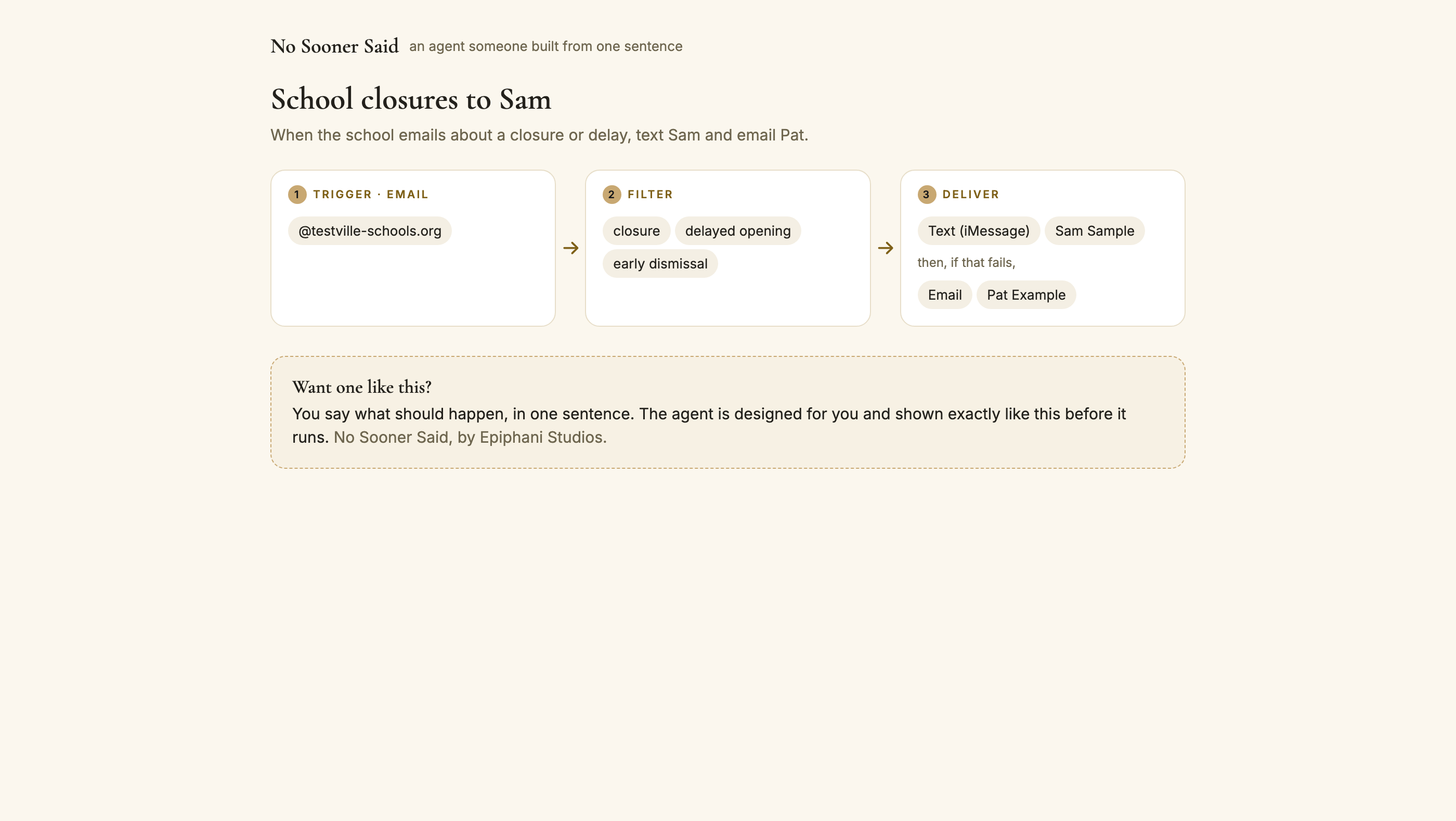
The share page works the same way, turned outward: one agent, drawn as its pipeline, for the person it helps. Your spouse sees the school-closure agent exactly as it runs. Your bookkeeper sees the card-code agent and nothing about your household. The link switches off with one click.

Both are built on the same rule: the page tells you what the agent will do, in the words you would use, and never hides the mechanism behind a diagram. When a delivery fails, the feed records which destination refused and why, and the next one in the chain is tried on the spot, so the person reading the page in the morning sees the whole story of the night in one list, including the part where the backup route carried the message.

A shared agent page: School closures to Sam, drawn as Trigger (email from @testville-schools.org), Filter (closure, delayed opening, early dismissal), Deliver (text Sam Sample, then if that fails, email Pat Example), with a Want one like this note

When something breaks

An agent that fails tells you. In words. The same day.

Failures are written where successes are

When every destination in an agent's chain fails, the activity feed records the agent, the reason from each destination, and the time, in the same list as the deliveries. There is no separate error console to remember to open.

A quiet Mac is named

If a Mac stops checking in, the Machines panel says "quiet, last seen 14 minutes ago" instead of a green dot that stays green. You see it before the thing it was supposed to forward matters.

Sender lists do not rot

Phone automations match on contacts, and a deleted contact silently turns a rule into one that matches nothing. Agents match on the sender number or address itself, with the company label kept beside it, so nothing decays when an address book changes.

The agent you read is the agent that runs

Both Macs pull the same agent document every minute and report which version they hold. A change you save is on every machine within 60 seconds, and the page tells you when it landed.

Every send is confirmed, not assumed

A Slack post is confirmed by the channel; an email by the send going through; a text by the Messages app. A destination that did not confirm is treated as failed and the next one is tried.

Nothing runs twice

Each delivery carries a stable identity built from the agent and what it extracted, so a message seen by two Macs, or seen twice by one, produces one delivery.

Where it came from

Built because a phone automation died quietly on a Thursday.

For two years a set of iPhone automations forwarded bank codes and card alerts to the people who needed them: a Slack channel for the team, two inboxes for the bookkeepers, a text to a spouse. They worked until the day the Mail app was deleted from the phone. The automations kept their green toggles and stopped sending. Nobody found out for two weeks, and the way we found out was a team member asking why the codes had stopped.

The replacement was written that night as a small program on a Mac: read the messages, match the senders, send to Slack with email as the fallback, and write a line for every delivery. It had one flaw: only the person who wrote it could read it. So the console came next, with the agent drawn as a pipeline anyone in the house could understand. Then the sentence box, so nobody has to open an editor at all.

Then we went back through everything else we had automated over a decade of rented rails, and found the same story everywhere: the ambitious ones never ran, the running ones said nothing, and the judgment jobs had never been possible at all. Those became the reasoning tier. That is the whole product: a staff of agents you can read, on machines you already own, with every action written down.

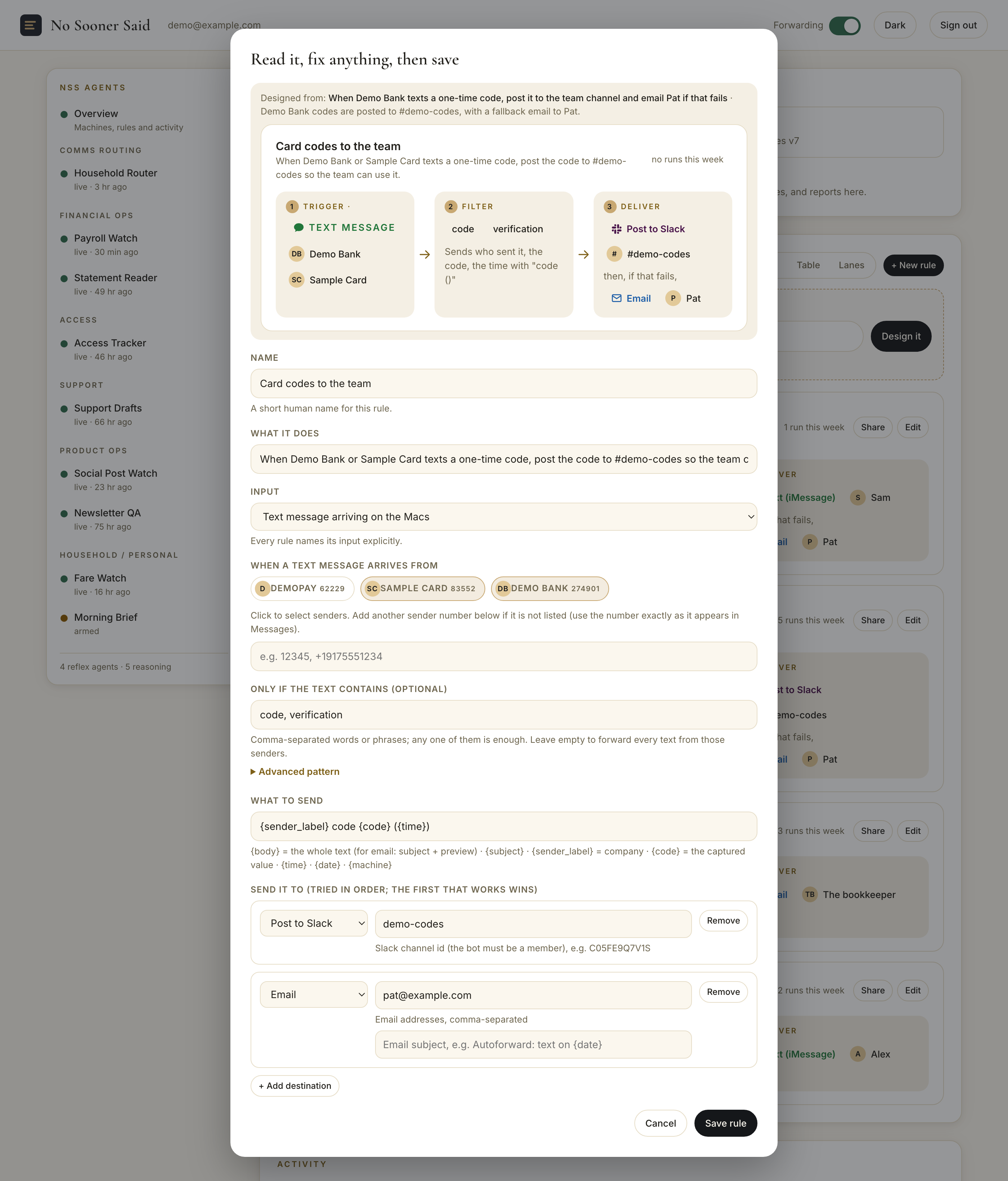
A designed agent opening in the editor over the console: Read it, fix anything, then save. The sentence it came from, the pipeline preview (Trigger: text message from Demo Bank and Sample Card; Filter: code, verification; Deliver: post to Slack #demo-codes, then if that fails, email Pat), and the editable fields below

Glossary

The nine words every agent is built from.

Agent

One standing automation with a name, a job, and a page of its own. You describe it in a sentence; it exists from then on.

Tier

Which kind of mind the agent has. Reflex: a deterministic rule, no model in the loop, tried every minute. Reasoning: a model that reads, decides, and drafts, on its schedule.

Trigger

What arrives and from whom. A text message from a listed sender, or an email from a listed address or domain. Every reflex agent names its trigger on the page.

Filter

What has to be in the message for the agent to act: plain phrases like "closure" or "verification code", any one of which is enough. Leave it empty and every message from those senders passes.

Template

What the agent sends: the whole message, or a sentence built from the pieces it pulled out, like the code, the time, and who sent it.

Deliver

Where it goes, in order. The first destination that confirms ends the chain; the next is the fallback.

Design

The moment you type a sentence and the agent is drawn for you. Each plan includes a monthly number of designs; runs are never counted.

Feed

The one list where every agent's every action lands, one line each: what acted, what it did, where it went, when.

Console

The web page that holds your staff: the sidebar by category, the machines, the feed, and every agent's eight panes.

Compare

The same promise, without the builder.

Every price below was read from the vendor's own pricing page on August 21, 2026, and is linked so you can check it. Every tool here is good at what it does; the rows are the things we built this for.

Versus the alternativesNo Sooner SaidIFTTTZapiern8nMakeApple Shortcuts
Describe it in one sentence and read the result as a pipeline before it runsYes, on every planCard composer; AI Copilot on paid plansCopilot drafts a Zap from textAI Workflow Builder on cloud plansMaia in the scenario builderManual When / Do cards
What the meter countsNothing per run, on every plan; designs are counted monthlyApplets owned (2 free, 20 Pro)Tasks per month (100 free, 750 at $19.99)Executions per month (2,500 Starter)Operations per month (1,000 free)Nothing
Text messages as an inputYes, from the Mac's copy of your messagesVia a third-party SMS serviceVia a third-party SMS serviceVia a third-party SMS serviceVia a third-party SMS serviceOn the iPhone, one automation at a time
Every agent names its input and its destinations on the pageYes, with a badge per rulePer applet detail viewPer Zap editorPer node on the canvasPer module on the canvasPer automation
Ordered fallback delivery (try Slack, then email)Yes, built into every agentMulti-action on ProPaths on paid plansError workflowsError handlers and routersIf/Otherwise actions
Read-only share page per automationYes, one link per agentPublish an applet for others to connectShare a Zap templateExport JSON or publish a templateTemplate sharingShare a shortcut file
Entry price$0 for 3 agents; Pro $19.99 per month billed annually$0 for 2 applets; Pro $2.99; Pro+ $8.99$0 for 100 tasks; Professional from $19.99 per month, billed annuallyStarter EUR 20 per month, billed annually; free self-hosted$0 for 1,000 operations; Core $12 per monthFree, built in

Sources: the linked vendor pages, read August 21, 2026. Plan names and limits are theirs; "Yes" in our column means shipped and running today.

Privacy

Messages are read on your Mac. Here is exactly what leaves it.

Your messages stay home

Text messages are read from the copy Messages keeps on your Mac, by a small program that runs every minute. Your text messages are never uploaded to our servers.

Email is read, not kept

The inbox you connect is read with a read-only permission. Agents match on the subject and the preview text, and nothing is stored beyond the agent's own record of what it sent.

What the service stores

Your account email, your agents (the rules), your contacts' labels, the activity feed (one line per action: which agent, where it sent, when, which Mac), each Mac's check-in time, and, on paid plans, billing handled by the payment processor. Visit counts on this page are collected only if you allow them below.

The sentence goes to the model, your messages do not

When you type a sentence, that sentence, your rule names, your sender labels, and your recipient names go to the language model that designs the agent. Message bodies do not. A reasoning agent is the one exception, and you configure it: it sends the model the document you point it at, and what our service stores is the line it writes back.

A reasoning agent proposes; a person approves

Reasoning agents read, compute, and prepare. They post to your own channels and feed, and anything addressed to another person is a draft until you send it. Your approval is the last step, every time.

Share pages show one thing

A shared agent renders only that agent's own data. Nothing about your other agents, contacts, or activity is on that page.

Pricing

No meter on runs. Ever.

Runs are never counted on any plan. Each plan includes a monthly number of designs, the moment a sentence becomes an agent.

Free

$0
forever
  • 3 agents, unlimited runs, 1 Mac
  • Text message and email inputs
  • All six destinations with fallback
  • 10 AI designs a month
  • Share links
Ask for an invite

Pro

$19.99 / month
billed annually at $239.88, or $24.99 month to month
  • Unlimited agents, unlimited runs
  • 200 AI designs a month
  • All six destinations with ordered fallback
  • Up to 3 Macs, no double sends
  • 30-day money-back guarantee
Ask for an invite

Business

$34.99 / seat / month
billed annually, 3-seat minimum
  • Everything in Pro, per person
  • Shared agents across the team
  • Admin view and audit trail
  • Concierge setup of your first agents
  • 30-day money-back guarantee
Talk to us
First-year price: 50% off Pro or Business for the first year, for accounts opened by December 31, 2026. The price above is the price from year two.

FAQ

Frequently asked questions

What is an NSS Agent?

NSS is short for No Sooner Said. An NSS Agent is one standing automation with a name, a job, and a page of its own. You describe the job in a sentence; the agent exists from then on. It appears in the console's sidebar under its category, and everything it does lands in the activity feed as one readable line.

What is the difference between a reflex agent and a reasoning agent?

A reflex agent is deterministic: a rule you can read, run every minute on your own Mac, with no model in the loop at run time. A reasoning agent uses a model to do a job rules cannot express: read a statement and write the summary, read replies and track state, draft a response. Reasoning agents run on their own schedule and report in the same feed.

Can a reasoning agent message someone on its own?

Anything addressed to another person is a draft until you send it; your approval is the last step, every time. Posting a summary to your own channels and your own feed is the job you gave it, and every one of those posts is a line you can read.

Can it read the texts on my iPhone?

It reads the copy of your texts that Messages keeps on your Mac (Text Message Forwarding turns that on in about a minute), so a Mac that is awake is what makes text-message agents run. Apple provides no way for an app to read messages on the iPhone itself.

What does the AI actually do when I type a sentence?

It designs the agent from your sentence: which sender, which phrases, what to send, where to send it and what to try if that fails. It never runs anything on its own. You read the pipeline it drew, change what you like, and only then save it.

Is there a task meter?

No. Every plan runs every agent as often as it fires. Each plan includes a monthly number of designs (the moment you type a sentence): 10 on Free, 200 on Pro, and 200 per seat on Business.

What can an agent send to?

Slack (a channel), email, iMessage or text message (SMS) through Messages, any https webhook, a named Shortcut on your Mac, or a plain log. Destinations are tried in order, so the second one only fires if the first fails.

What can an agent listen to?

Reflex agents watch text messages arriving on your Mac and email arriving in the inbox you connect, and every one names its input on its page. Reasoning agents work from the documents and threads you point them at, on their schedule.

Where does my data go?

Reading happens on your Mac. What leaves is exactly what you routed, to exactly where you routed it, plus a one-line activity entry (which agent acted, where it sent) so you can see your agents working. Your text messages are never uploaded to our servers.

Can I share an agent?

Yes. Every agent has a share link that renders that one agent as a read-only pipeline for anyone, and nothing else from your account. Turn it off with one click.

Do I need a Mac?

Yes. The runner is a Mac app because the Mac is the only place Apple lets a program read your messages, and it is also a fine place to read email. The Mac needs to be on and awake; a desktop that stays home or a laptop on a desk both work. The console is a web page you can open anywhere.

What happens if my Mac is asleep?

The agent runs on its next check-in after the Mac wakes, and it looks back over the messages that arrived while it slept and reads them too. A message read late is marked late in the activity feed rather than pretending it was on time.

Can I write the rule myself instead of a sentence?

Yes. Every reflex agent opens in an editor with the senders, phrases, template, and destinations as plain fields. The sentence is the fast way in, never the only way.

Can I cancel?

One click, any time, and every paid plan comes with a 30-day money-back guarantee. Your agents keep running on the Free plan's limits.

Ask for an invite

Tell us the first sentence you would type.

Access is by invite. Leave your email and, if you like, the agent you want first. You hear back from a person.

Used only to send your invite. Nothing else, and no list.